

Smash Colors
Where can I play Smash Colors online?
Press Play Now above to play Smash Colors free in your browser. In the song list, try Someone You Loved with its Easy badge, then press Play beside the song. Wait for Hold & Drag to control before starting your run. You can play with a mouse or touch, without installing an app.
If the embedded player stays blank, you can open Smash Colors directly in a new tab (opens in a new tab). The link opens the game; this page provides the controls and guide.
About Smash Colors
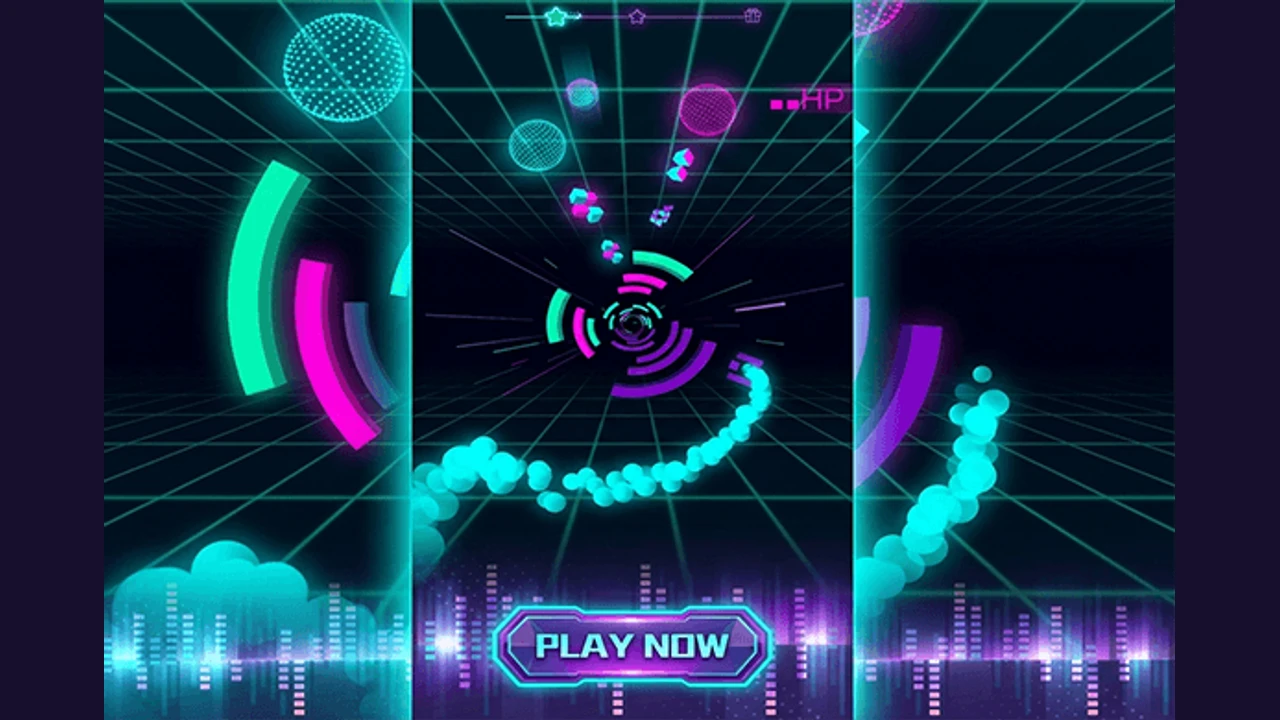
The beat pulls you forward. A broken ring rushes closer. Can you swing the ball into its matching color before it reaches you? Smash Colors puts quick color decisions inside a neon 3D music run: hold and drag sideways to steer around the tunnel, smash the matching segments, and line up the next ring. A gap will not earn you a safe pass, and the wrong color can end a promising run. If you like color games but want music, motion, and a reason to try that same tricky passage again, Smash Colors gives you all three.
Smash Colors controls: one drag, a full circle of movement
On a computer, hold the mouse button inside the game and drag left or right. On a touchscreen, keep a finger down and slide sideways. Your drag moves the ball around the tunnel, so use small corrections to meet a colored segment instead of sweeping past it. Forward movement follows the song once the run begins.
Use Fullscreen above the player if you need more room to read the rings. Let each song finish loading before dragging, and use headphones if they help you hear its pulse. Smash Colors needs an internet connection to load; no download means you do not need a separate app.
Why try Smash Colors for your next color game?
Recognizing the color is only half the challenge. Smash Colors asks you to reach it while the music and the tunnel keep moving.
- Match the ball's current color to a ring segment. Sliding through an empty gap still misses the target.
- Color gates can change the ball and the tunnel palette. Check the ball again before aiming at the next ring.
- Perfect, Great, and Miss give immediate feedback. Watch the hearts as well as the score to understand how your run is going.
- Choose a song by its difficulty badge. Easy, Normal, and Hard belong to individual tracks, so start with a manageable song before chasing a harder one.
- Glowing grids, geometric frames, and a bright ball trail make the route feel alive. Keep your attention on the nearest ring when the scenery gets busy.
Songs in Smash Colors
Someone You Loved — Easy
A useful first choice in Smash Colors if you want to learn the drag before tackling a Normal track. Repeat the opening until small sideways movements feel predictable.
Believer — Normal
Choose Believer when you want to move beyond an Easy badge. Keep reading the next matching segment rather than watching the trail left by your last hit.
Dance Monkey — Easy
Try another Easy song when you want a different rhythm without immediately moving up a difficulty. Check its Play button for any unlock prompt before starting.
How To Play Smash Colors?
Start Smash Colors with one aim: hit the right color on every ring. Improve your score after you can keep the ball on that route.
- Press Play Now, choose a song in the list, and press its Play button. Read the Easy, Normal, or Hard badge before choosing.
- Wait for the ball and Hold & Drag to control prompt. Press and hold in the game, then drag sideways to begin.
- Compare the ball's color with the nearest ring. Steer toward the matching segment before it reaches the ball.
- Keep holding and make short left or right adjustments for the following rings. Avoid different colors and do not aim through the gaps.
- After a color gate, use the ball's new color for your next match. Use Perfect and Great as feedback, and watch for Miss and lost hearts.
- If the run ends, check your score and use the circular replay button to try that song again. The back arrow returns to song selection.
Smash Colors: choose a song, read the ring, try again
How can I last longer in Smash Colors?
Use each attempt to fix one problem: the wrong color, a missed segment, or a drag that goes too far.
Aim for the middle of the matching segment
Perfect rewards a tighter alignment than Great. First make sure you hit the correct segment at all, then reduce your corrections and aim closer to its center. Swinging across the whole screen can turn an easy match into a miss.
Read ahead when the ball changes color
A run of successful pink hits does not mean pink stays correct. Check the ball after a color gate and find the new match immediately. Listen to the beat for pacing while your eyes pick the route.
Treat hearts as feedback, not permission to collide
Smash Colors starts the run with two hearts. A miss can cost a heart and reset the rising points earned per hit; some wrong-color collisions can stop the run immediately. Plan to connect with every ring rather than spending hearts to skip an awkward one.
Replay one song before moving up
Use the replay button to learn a difficult passage while its rhythm is still familiar. If a Normal track keeps ending early, return to an Easy song and practise smaller drags. Optional Continue prompts can carry a video requirement; No Thanks leads back toward a fresh attempt.
Who Will Enjoy Smash Colors?
- Try Smash Colors if you enjoy music games and want to steer with a mouse or finger instead of learning a set of note keys.
- Choose Smash Colors when you want a color matching challenge with moving targets, quick reactions, and short attempts you can replay.
- Expect bright neon effects and constant forward motion. For a slower paint-mixing task, try Color Match. For a timed shade search without steering, try Color Nuances.
Find your rhythm in Smash Colors
Pick an Easy song, hold the ball, and aim for the first matching segment. Let the beat set your pace, watch the ball after each color change, and make your next Smash Colors run a little cleaner than the last.
Smash Colors at a glance
| Game | Smash Colors |
|---|---|
| Goal | Finish a song by smashing rings that match the ball's color |
| Controls | Hold the mouse button or a finger down and drag sideways |
| First song to try | Someone You Loved — Easy |
| Watch | Ball color, next ring segment, hit feedback, and hearts |
Smash Colors FAQ
Can I play Smash Colors free without downloading an app?
Yes. Press Play Now to load Smash Colors in your browser, then choose a song. You need an internet connection for the game and its music. Optional unlocks or Continue prompts may involve advertising.
How do I control the ball in Smash Colors?
Hold the mouse button or keep a finger pressed inside the game and drag left or right. This steers the ball around the tunnel. Keep aiming at ring segments that match the ball's current color; tapping repeatedly is not the movement control.
Which Smash Colors song should I start with?
Try Someone You Loved, marked Easy in the song list. Dance Monkey also has an Easy badge. Believer is marked Normal. Choose a song's Play button rather than looking for a separate difficulty selector.
Why do I lose hearts even when I avoid other colors?
You still need to hit a matching segment on every ring. Passing through a gap counts as a miss. Watch the Miss feedback and aim for the center of the next matching segment. Some wrong-color collisions can end the run immediately.
What do Perfect and Great mean in Smash Colors?
Both signal a successful hit. Perfect means a closer alignment with the target's center. Consecutive hits increase the points earned per hit up to a limit; a miss resets that increase, so a clean sequence matters when improving your score.
How do I retry a Smash Colors song?
If a Continue prompt appears, choose No Thanks when it becomes available to reach the results. Use the circular replay button at the bottom for another attempt, or the back arrow to return to song selection.
What if Smash Colors stays on the loading screen?
Allow the initial game files and the chosen song to load. If progress stops, use Reload above the player or the direct game link near the start of this guide. Wait for Hold & Drag to control, then press inside the game to begin.
Related Games
- Color Nuances — Play Color Nuances online for free. Spot a different shade before time runs out, then unlock Diff Mode to find odd letters and numbers.
- Color Match — Play Color Match online for free with no download. Blend paint to match an object, check your accuracy, and learn how to adjust a difficult shade.
- Color Rotate Rings — Play Color Rotate Rings online for free. Turn rings, slide bars, and untangle gears and spiral locks at your own pace while protecting your mistake hearts.
- Hexellent — Play Hexellent online for free. Place hexagon stacks beside matching colors, build groups of at least ten, and reach each board's score target.